
Microsoft support update: Office 2021 reached the end of support on October 13, 2026, and Publisher was retired the same month. Office 2024 Standard and Office 2024 Professional Plus are now the only perpetual Office editions still receiving security updates, and both are supported until October 9, 2029. Check the supported operating systems before you buy.
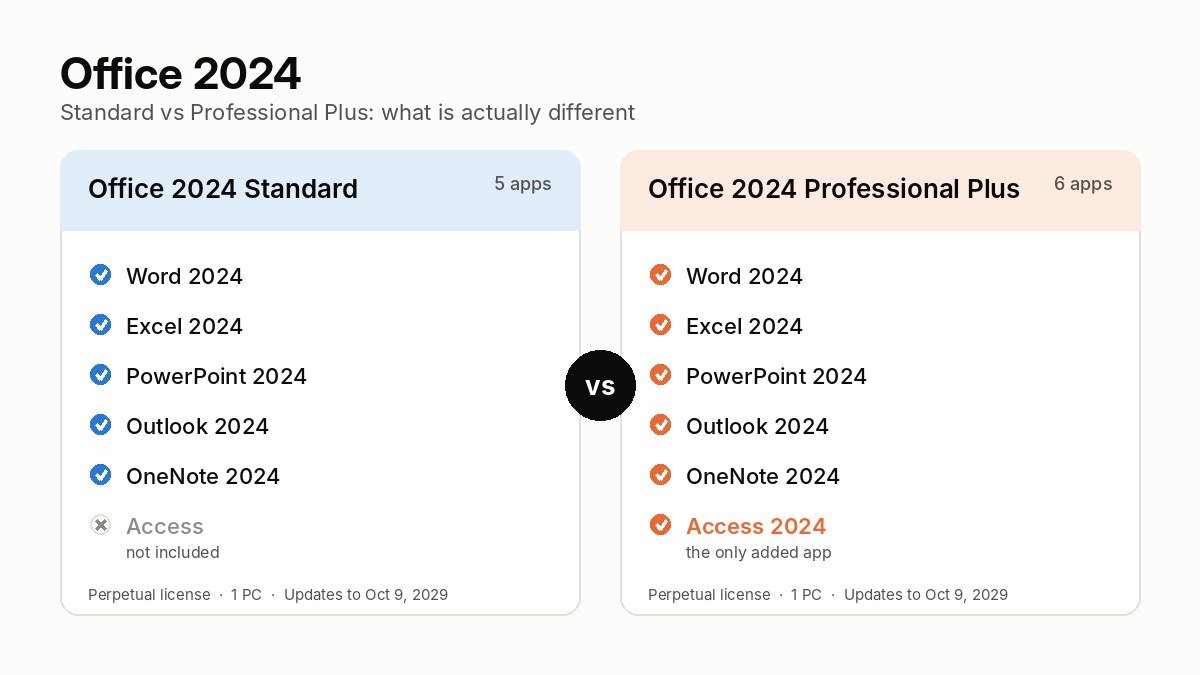
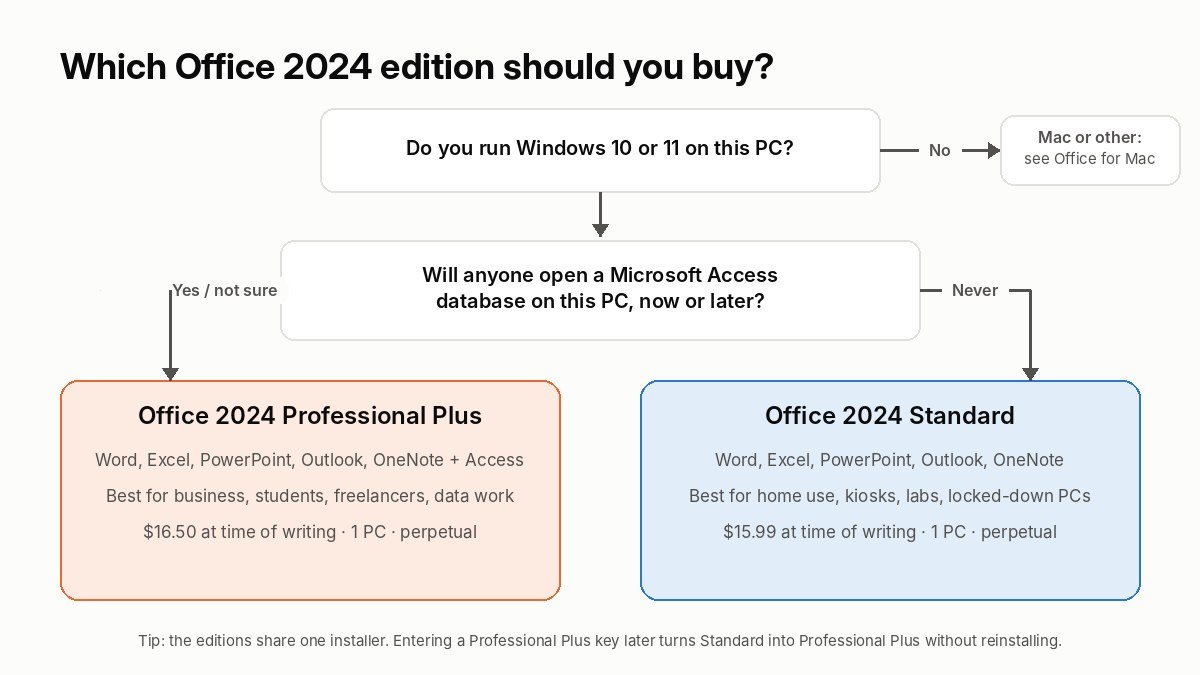
If you are weighing Office 2024 Standard vs Professional Plus, here is the whole decision in one breath: the two editions run the same Word, Excel, PowerPoint, Outlook and OneNote, built from the same code, patched on the same schedule and supported until the same date. Professional Plus adds Microsoft Access (plus an optional Skype for Business client). That is the entire gap. So the question is not “which one is better”, it is “will I ever open Access?” If the answer is yes, maybe or I don’t know, buy Office 2024 Professional Plus. If you are certain the answer is no and you want the leaner install, Office 2024 Standard does everything else identically.
At the time of writing the two Office 2024 licenses in our store are 51 cents apart, so price will not make the decision for you either. What follows is everything we know from selling and supporting both editions, so you can pick with your eyes open and not have to buy twice.
Office 2024 Standard vs Professional Plus: the short answer
Office 2024 Standard is the five-app suite: Word, Excel, PowerPoint, Outlook and OneNote. Office 2024 Professional Plus is the same five apps plus Access, with Skype for Business available as an optional install during setup. Both are one-time purchases, both are perpetual licenses tied to one Windows PC, both receive security updates until October 9, 2029, and both run on Windows 10 and Windows 11. Neither includes Publisher or Teams, and neither includes Copilot or OneDrive storage. There is no difference in the version of Excel, the file formats, the macro support, the ribbon or the activation method.
| At a glance | Office 2024 Standard | Office 2024 Professional Plus |
|---|---|---|
| Word, Excel, PowerPoint, Outlook, OneNote | Yes | Yes |
| Access (desktop database) | No | Yes |
| Skype for Business client | No | Optional install |
| Publisher | No (retired) | No (retired) |
| Teams | Separate free download | Separate free download |
| License type | Perpetual, one PC | Perpetual, one PC |
| Security updates until | October 9, 2029 | October 9, 2029 |
| New features after purchase | No (fixed feature set) | No (fixed feature set) |
| Operating system | Windows 10 / 11, Server 2022 / 2025 | Windows 10 / 11, Server 2022 / 2025 |
| Mac version | Yes (Office LTSC Standard for Mac 2024, volume only) | No |
| Price in our store (at time of writing) | $15.99 | $16.50 |
If that table already answered your question, the two products are Microsoft Office 2024 Professional Plus (1 PC, lifetime key) and Microsoft Office 2024 Standard LTSC (1 PC, lifetime key). If you want the reasoning, the edge cases and the things Microsoft’s own comparison pages gloss over, keep reading.
What is Office LTSC 2024, and why do both editions carry that name?
The first thing that confuses people shopping for a Microsoft Office 2024 perpetual license is the naming. Microsoft sells Office 2024 under two umbrellas that look like different products but mostly are not.
The consumer line, sold in retail boxes and on Microsoft’s website, is called Office Home 2024 and Office Home & Business 2024. The commercial line, sold through volume licensing to businesses, schools and government, is called Office LTSC 2024. LTSC stands for Long-Term Servicing Channel, and it means the feature set is frozen on the day of release and the product only ever receives security and stability fixes. The two LTSC editions are Office LTSC Standard 2024 and Office LTSC Professional Plus 2024.
When you see “Office 2024 Professional Plus”, “Office 2024 ProPlus”, “Microsoft Pro Plus 2024” or “Office LTSC Professional Plus 2024” on a product page, forum or invoice, they all describe the same build. The same goes for “Office 2024 Standard” and “Office LTSC Standard 2024”. Microsoft’s own documentation uses the LTSC names; resellers and most buyers drop the LTSC because it is a mouthful. We list our products as Office 2024 Standard LTSC and Office 2024 Professional Plus so that both search terms find the right page.
The same goes for the words people type when they shop. “Office Professional Plus 2024”, “MS Office 2024 Professional Plus”, “Office 2024 LTSC”, “Office Standard 2024”, “Office Pro 2024”, “Office 2024 Professional Plus LTSC” and “Microsoft Office 2024 business edition” all describe one of the same two products. So do “Microsoft Office 2024 Professional Plus lifetime key”, “Office 2024 lifetime license” and “Microsoft Office perpetual license 2024”, which are just different ways of saying a one-time purchase that does not expire. If you have been comparing Office 2024 versions across several sites and the names keep shifting, that is why: there are only two Windows editions under all of those labels.
Why does this matter to you? Because the LTSC editions are the only way to get a perpetual Office 2024 with Access, and the only way to get a perpetual Office 2024 with Outlook without paying the Home & Business price. Office Home 2024 (Microsoft list price $149.99) has no Outlook and no Access. Office Home & Business 2024 ($249.99) adds Outlook but still has no Access. The LTSC Standard edition sits roughly where Home & Business does in terms of apps, and the LTSC Professional Plus edition is the only one that includes everything. That is why, for most people reading this, the real comparison is Standard vs Professional Plus and not Home vs Home & Business. If you are on the consumer side of that fence, our Office Home and Student vs Home and Business guide covers it.
One more naming note, because it comes up in our support inbox every week. “Office 2024” is not “Microsoft 365”. Microsoft 365 is the subscription, with Copilot, cloud storage and monthly feature drops. Office 2024 in either edition is the buy-once version. We have a full breakdown in Office 2024 vs Microsoft 365, and we come back to it near the end of this article for the people for whom neither Standard nor Professional Plus is the right fit.
What apps are in Office 2024 Standard vs Professional Plus?
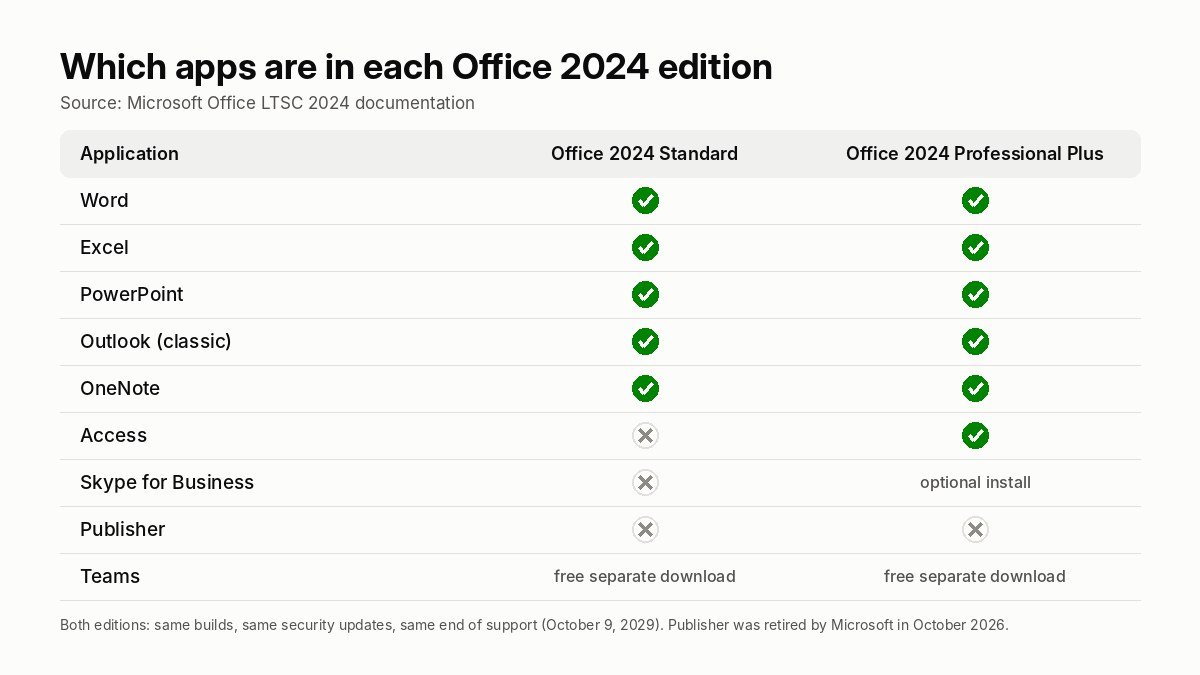
Here is the exact application list, taken from Microsoft’s Office LTSC 2024 overview rather than from a reseller comparison chart. We mention that because a surprising number of comparison charts online still list Publisher under Professional Plus, which has not been true since the 2024 release.
| Application | Office 2024 Standard | Office 2024 Professional Plus | What it does |
|---|---|---|---|
| Word 2024 | Included | Included | Documents, letters, reports, mail merge, PDF export |
| Excel 2024 | Included | Included | Spreadsheets, pivot tables, Power Query, dynamic arrays, VBA macros |
| PowerPoint 2024 | Included | Included | Presentations, Recording Studio, cameo, closed captions |
| Outlook 2024 (classic) | Included | Included | Email, calendar, contacts, tasks, IMAP / POP / Exchange |
| OneNote 2024 | Included | Included | Notebooks, ink, clipping, local and cloud notebooks |
| Access 2024 | Not included | Included | Desktop relational database, forms, queries, reports, VBA |
| Skype for Business | Not included | Optional during setup | Legacy client for on-premises Skype for Business Server |
| Publisher | Not included | Not included | Retired by Microsoft in October 2026; last version was 2021 |
| Teams | Not bundled | Not bundled | Free separate download from Microsoft |
| Project, Visio | Sold separately | Sold separately | Project 2024 and Visio 2024 are standalone licenses |
A few things in that table deserve a closer look, because they are where buyers go wrong.
Outlook is in both editions
This is the biggest difference between the LTSC editions and the consumer Office Home 2024 box, and it is why we point so many home users toward Office 2024 Standard instead. If you run a personal email account in a desktop client, you get the full classic Outlook 2024 in either LTSC edition. It is the classic Win32 Outlook, not the “new Outlook” web-based app, which matters if you rely on PST archives, rules that run on the desktop, add-ins or offline access.
Publisher is gone from both
Publisher was still part of Office 2021 Professional Plus, and plenty of people buy Office 2024 expecting it. It is not there. Microsoft removed it from Office 2024 ahead of retiring the product entirely in October 2026. If you have a workflow built on Publisher files, your options are to keep an older Office 2021 or 2019 install alongside 2024 (which works, with some care), move the layouts into Word or PowerPoint, or use a third-party desktop publishing tool. We still sell Office 2021 Professional Plus for that reason, but be aware it no longer receives security updates.
Teams is not bundled, and that is fine
Microsoft stopped bundling Teams with Office installs in 2024. The Teams app is a free download and works with or without an Office license, so this is a non-issue for the Standard vs Professional Plus decision. It just means the installer is smaller.
Access is the only app that separates them
We will spend a whole section on Access below, because it is the only thing you are paying for when you choose Professional Plus, and whether you need it is the entire question. Skype for Business is technically a second difference, but it is a client for on-premises Skype for Business Server, which almost no small business or home user runs any more. Since Office 2024 launched in October 2024 we have not had a single customer buy ProPlus for Skype for Business.
Do you actually need Microsoft Access? The only question that matters
Access is a desktop relational database. You use it to store structured records in tables, link those tables together, build data-entry forms, write queries and print reports, all from one file that lives on your PC or a shared drive. It has been part of Office Professional editions since the early nineties and it is still the fastest way to build a small, local, multi-table database without learning SQL Server or paying for a cloud platform.
You probably need Access, and therefore Office 2024 Pro Plus, if any of these sound like you:
- Your company, accountant, landlord, club or church already has an .accdb or .mdb file that someone built years ago and everyone still uses.
- You have outgrown Excel for record keeping: thousands of rows, several related lists (customers, orders, products), multiple people editing, and you keep breaking formulas.
- You run inventory, memberships, bookings, a patient or client list, invoices or a parts catalogue and want proper forms and reports rather than a spreadsheet.
- You are studying for a course or certification that uses Access (a lot of business and IT programs still do).
- You develop or maintain line-of-business tools in VBA that use Access as a front end for SQL Server or SharePoint data.
- You want the new Access Dataverse connector in the 2024 release to link desktop databases to Power Platform.
You probably do not need Access if your work is writing, spreadsheets, slides and email, and you have never once opened the program. Most home users and a large share of small businesses are in this group, and for them Office 2024 Standard is the complete suite. But here is the practical catch that our support team sees constantly: people underestimate how often a random Access file turns up. A supplier sends a price list as a database, a new job uses a legacy tool, a relative asks for help with the parish records. Without Access installed, that file is a brick. Microsoft offers a free Access Runtime that can open and run an existing database, but it cannot design or edit one, and the runtime download is tied to a specific build that must match the Office version on the machine.
Because the price gap between the two editions in our store is under a dollar, our honest advice for anyone who is not sure is to buy Professional Plus. The downside of having Access and never using it is about 1 GB of disk space. The downside of not having it when you need it is buying a second standalone Access 2024 license, which costs three times what the whole Pro Plus suite does.
Everything the two editions share
Because the comparison is so lopsided, it is worth being explicit about what you are not giving up by choosing Standard. People assume “Standard” means a watered-down Excel or a Word that is missing features. It does not. Both editions install from the same Office LTSC 2024 media, and the edition is decided purely by the product key you enter.
Identical apps, identical builds
Word 2024 in Standard is byte-for-byte the same Word 2024 as in Professional Plus. The same is true of Excel, PowerPoint, Outlook and OneNote. Every feature, every file format, every add-in model and every keyboard shortcut is shared. When Microsoft ships a monthly security update, both editions get the same build number on the same day.
Same new features over Office 2021
Office 2024 is a modest but real step up from Office 2021, and both editions get all of it. The highlights, straight from Microsoft’s “What’s new in Office 2024” list, are these.
In Excel, fourteen new text and array functions arrived: TEXTSPLIT, TEXTBEFORE, TEXTAFTER, VSTACK, HSTACK, TOCOL, TOROW, WRAPROWS, WRAPCOLS, TAKE, DROP, CHOOSEROWS, CHOOSECOLS and EXPAND. If you have ever split a column of full names into first and last with LEFT, FIND and LEN, TEXTSPLIT alone will make you happy. There is also the IMAGE function, which places a picture from a URL directly into a cell, dynamic charts that redraw themselves when a dynamic array spills, and a general round of performance work that makes large workbooks open and recalculate faster. XLOOKUP, LET and dynamic arrays were already in 2021, so if you are coming from 2019 or earlier you get those too.
In PowerPoint, Recording Studio lets you record a narrated, camera-in-the-corner presentation and export it as a video without a third-party screen recorder. Cameo places your live camera feed inside a slide as a design element. You can embed Stream videos and add closed captions to audio and video you insert.
In Word, a session recovery feature reopens the documents you had open after a crash or an update reboot. Word and PowerPoint both gained the ability to react to comments with a like. All three document apps now read and write OpenDocument Format 1.4.
In Outlook, search across mail, calendar and contacts was rebuilt and is noticeably quicker on large mailboxes, and the meeting creation dialog has more options. OneNote 2024 has a reworked Draw tab with better ink tools. The whole suite ships with a new default theme and improved accessibility tooling across Word, Excel, PowerPoint and Outlook.
What you do not get in either edition, compared with Microsoft 365: Copilot, Designer, Editor’s premium rewrite suggestions, real-time co-authoring in the desktop apps, 1 TB of OneDrive, and the monthly feature updates. That is the subscription trade, and it has nothing to do with Standard vs Professional Plus. We cover the full list in Office 2021 vs Office 2024 and Microsoft Office versions compared.
Same license terms and support date
Both editions are perpetual licenses. Microsoft’s lifecycle policy gives Office LTSC 2024 five years of mainstream support and no extended support, which puts the end date at October 9, 2029. Until then both editions receive security patches through Windows Update or the Office update channel. After that date the software keeps working, as Office 2016 and 2019 still do today, but without patches. A product key does not change that date in either direction.
Same installer, same activation
You download Office 2024 from Microsoft, run setup, and activate with your key, either in File > Account inside any Office app or with a short command. The installer is the same Office Deployment Tool package for both editions. If you ever decide to move from Standard to Professional Plus, you do not reinstall anything: you change the product key and Access appears after a repair. Our guides walk through both: Office LTSC 2024 Standard download and activation and Office 2024 Professional Plus download and activation.
Same system requirements
Microsoft lists a 1.1 GHz two-core processor, 4 GB of RAM, 4 GB of free disk space and a 1280 x 768 display as the floor for Office LTSC 2024. The supported operating systems are Windows 11, Windows 11 LTSC 2024, Windows 10 LTSC 2019 and 2021, Windows Server 2022 and Windows Server 2025. Standard Windows 10 installs still run Office 2024 happily, but Windows 10 itself left support in October 2025, so if you are on it, read our Windows 10 end-of-life guide before you spend money on anything. A 64-bit install is required for 4K and higher displays, and on Arm-based PCs Windows 11 is the minimum. Office 2024 does not run on Windows 8.1 or 7; if you are stuck on older hardware, Office 2016 is the last version that does.
If you are building a new machine at the same time, Windows 11 requirements explains what will and will not run it, and the Windows 11 Pro key plus Windows 11 Pro + Office 2024 Professional Plus bundle is the cheapest way to license both at once.
How much is Office 2024? Microsoft’s list price vs a perpetual license key
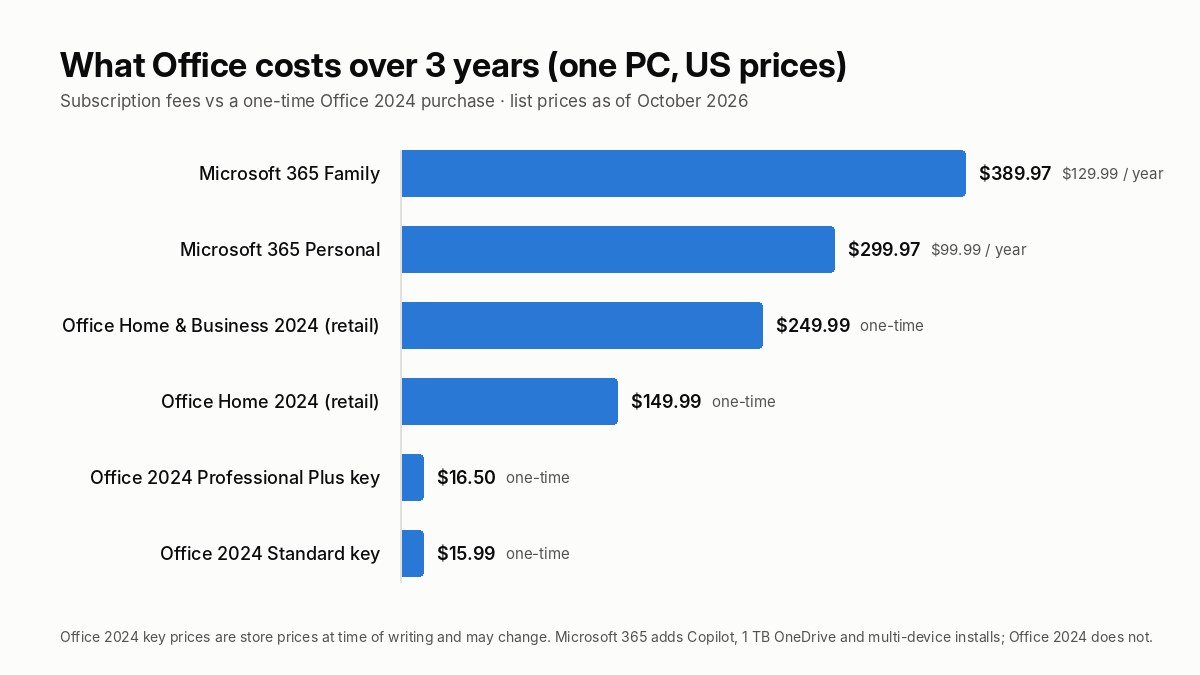
Searches for “how much is office 2024” and “office 2024 one time purchase” are some of the most common ways people land on this site, so here are the numbers in one place. Microsoft’s own retail prices in the United States are $149.99 for Office Home 2024 and $249.99 for Office Home & Business 2024. The LTSC editions are not sold at retail by Microsoft at all; businesses buy them through volume licensing at per-seat prices that are typically higher than the Home & Business box, because they include Outlook, Access (in Pro Plus) and volume activation rights.
We sell Office 2024 licenses as single-PC perpetual keys, delivered by email within minutes of payment. At the time of writing the prices are:
| Product | Apps | Price at time of writing |
|---|---|---|
| Office 2024 Standard LTSC, 1 PC | Word, Excel, PowerPoint, Outlook, OneNote | $15.99 |
| Office 2024 Professional Plus, 1 PC | Standard apps plus Access | $16.50 |
| Windows 11 Pro + Office 2024 Professional Plus bundle | Both keys for one PC | $19.50 |
| Windows 11 Pro + Office 2024 Pro Plus + Visio 2024 + Project 2024 bundle | Four keys for one PC | $21.99 |
| Office 2021 Professional Plus, 1 PC (out of support) | Includes Publisher | $12.99 |
| Access 2024 standalone, 1 PC | Access only | $49.99 |
Prices move, so treat the product page as the source of truth, but the relationship between them does not change much: the two editions sit within a dollar of each other, the standalone Access license costs more than the entire Pro Plus suite, and bundling Windows 11 Pro with Office adds only a few dollars over Office alone.
Why is a perpetual Office 2024 key this cheap?
Fair question, and one we answer in detail in Are cheap Windows and Office keys legit?. The short version: Microsoft sells Office through many channels at many price points, and keys sourced from volume agreements, bundled hardware programs and regional distributors cost far less than the single box on a store shelf. The key you receive is a genuine Microsoft key that activates on Microsoft’s servers, in File > Account, exactly like a retail key does. What you give up compared with a $249.99 retail box is the retail packaging, Microsoft’s own phone support and, in some cases, the right to move the license to a new PC later. We back every key with a 180-day money-back guarantee if it does not activate, and our refund policy spells out the terms.
The three-year math against Microsoft 365
Even if you compare against Microsoft’s list price rather than ours, a Microsoft Office 2024 perpetual license wins on cost for anyone who keeps a PC for more than about 18 months. Microsoft 365 Personal is $99.99 per year and Family is $129.99 per year. Over the three years from now until Office 2024 leaves support, that is $300 to $390 versus $149.99 to $249.99 for a retail Office 2024 or about $16 for a key from us. Over five years the gap is wider still. Microsoft 365 earns its price only if you want Copilot, need the apps on five or more devices, or will actually use the 1 TB of OneDrive storage. We have a worked comparison with the same numbers in Office 2024 vs Microsoft 365.
What “perpetual license” and “lifetime” really mean for Office 2024
Both editions are sold as a Microsoft Office 2024 perpetual license, and we describe our keys as lifetime licenses. Those words are accurate but they are also the source of most misunderstandings, so here is what they do and do not promise.
Perpetual means you pay once and the right to use the software never expires. There is no renewal, no annual fee and no “your subscription has lapsed, the apps are now read-only” moment, which is exactly what happens with Microsoft 365 when a card payment fails. Office 2024 Professional Plus bought today will still open, edit and save files in 2035.
Lifetime refers to the license, not to Microsoft’s support. Security updates stop on October 9, 2029. That is a hard date set by Microsoft’s Fixed Lifecycle Policy and it applies equally to Standard and Professional Plus. Running Office past that date is common (plenty of businesses still run Office 2016) but it means new vulnerabilities in the apps will not be fixed, and newer file-format features from Microsoft 365 users may not open cleanly.
One PC means one Windows installation at a time. A single key activates one machine. You can reinstall Office on the same PC as often as you like, including after a wipe or a Windows reinstall, and the key will activate again because Microsoft recognises the hardware. Moving the license to a different computer depends on the key type: retail keys can be transferred, volume-style keys generally cannot, and OEM keys never can. Our guide to Microsoft product keys and the companion piece on OEM vs retail licenses explain the differences, and each product page states what the key you are buying allows. If you expect to replace the PC in the next year or two, the price of a second key is low enough that most customers treat the license as belonging to the machine.
No new features means the build you install is the build you keep. Microsoft adds new functions, Copilot abilities and design tools to Microsoft 365 every month; Office 2024 in either edition never receives them. For a lot of people that is a feature, not a bug: the ribbon does not rearrange itself on a Tuesday, macros keep working, and IT does not have to retest every month.
Office 2024 Standard vs Professional Plus for different kinds of users
The generic answer is “buy Pro Plus unless you are sure you will never need Access”. The specific answer depends on who you are, so here are the situations we see most often, with the edition we would recommend and why.
Home user who wants Word, Excel and desktop email
Either edition works, and this is the group for whom Office 2024 Standard is a perfectly rational choice. You get classic Outlook, which Office Home 2024 does not include, for a fraction of the Home & Business price. If anyone in the household might take a business or IT course, go Pro Plus for the Access coverage. If you are shopping for a student specifically and want the lowest possible price, Office Home and Student vs Home and Business covers the cheaper consumer editions, though note they lack Outlook.
Freelancer or sole trader
Professional Plus. Not because you will use Access on day one, but because clients send strange files and you cannot afford to say “I can’t open that”. The install is identical otherwise. If you also produce diagrams or project plans, the Windows 11 Pro + Office 2024 Pro Plus + Visio + Project bundle gets you four lifetime keys for less than the cost of a single month of some creative subscriptions.
Small business with 2 to 20 PCs
Professional Plus on every seat, unless you have a strong reason to standardise on Standard. Mixed deployments cause support headaches: the one machine with Standard is always the one that needs to open the inventory database. Buy one key per PC (each key is a single-machine license, there is no family-style multi-device plan in the LTSC editions), keep the keys in a spreadsheet with the PC name next to each, and keep the order confirmation emails. Many business buyers pair the Office key with a Windows 11 Pro license, because Pro’s BitLocker and domain join are the sensible baseline for any machine that holds customer data.
Accountant, bookkeeper, analyst or anyone who lives in Excel
Professional Plus, and this is less about Access than about the ecosystem around Excel. Access is the natural place to park data that has outgrown a workbook, and the Access-Excel link (import, export, linked tables, Power Query against an .accdb) is seamless. Excel itself is identical in both editions, including Power Query, Power Pivot and the full VBA environment, so if you truly only ever need Excel, Standard will not hold you back. Excel 2024’s new TEXTSPLIT, VSTACK and TAKE functions, along with the faster recalculation engine, are the main reasons to prefer 2024 over a cheaper Office 2021 Professional Plus key.
Student
Professional Plus. Business, nursing, IT, data and admin programs regularly set Access assignments, and the standalone Access license costs more than the full suite. One lifetime key covers a four-year degree with a year to spare before support ends.
Developer, IT admin or power user
Professional Plus if anyone in your environment touches Access front ends, SharePoint-linked tables or legacy VBA tools; Standard if you are deploying to kiosks, shared workstations, labs or training rooms where fewer apps means a smaller attack surface and fewer things to lock down with Group Policy. Office LTSC 2024 is designed for exactly those long-lived, change-controlled machines, which is why it pairs so well with Windows 11 IoT Enterprise LTSC and Windows Server. To deploy Office LTSC 2024 at scale, both editions go out through the Office Deployment Tool with a configuration XML, activate with MAK-style keys, and can be installed offline once the source files are downloaded.
Mac user
Neither of the two products in this article, because they are Windows licenses. Microsoft does make Office LTSC Standard for Mac 2024, but only through volume licensing, and there is no Professional Plus for Mac at all (Access has never run on macOS). For Mac buyers, Office 2021 Home & Business for Mac remains the perpetual option we carry, and Microsoft Office for Mac versions and prices walks through the choices. If you run Windows in Parallels or Boot Camp on a Mac, the Windows editions work normally inside that Windows installation.
Someone replacing Office 2021, 2019 or older
Match or upgrade your current edition. If you had Office 2021 Professional Plus and used Access, you want Office 2024 Professional Plus. If you had Office 2019 Home & Business, Office 2024 Standard gives you the same apps plus OneNote and the 2024 improvements. The one trap is Publisher: if you used it, no 2024 edition has it. The Office 2021 vs 2024 article has the full change list, and because Office 2021 left support on October 13, 2026, there is no longer a security argument for buying 2021 over 2024.
Office 2024 Professional Plus vs Home & Business: a quick detour
People searching for “microsoft office 2024 professional plus vs home and business” are usually trying to work out whether the retail box they saw for $249.99 is better than the Pro Plus key they saw for a fraction of that. App-wise, Home & Business 2024 is Word, Excel, PowerPoint, Outlook and OneNote, which is the same list as Office 2024 Standard. Professional Plus is that list plus Access. So Pro Plus is strictly a superset of Home & Business, and Standard is its equal.
The differences that remain are about the license wrapper rather than the apps. Retail Home & Business keys are tied to a Microsoft account, can be moved to a new PC, include Microsoft’s support, and the Mac version of Home & Business exists. The LTSC keys are activated with a key rather than an account, are generally single-machine, and are supported by the reseller. If account-linked activation and transfer rights matter to you more than price, the retail product is the right call. If you want the most apps for the least money on one PC, Pro Plus is.
How to download, install and activate Office 2024 (either edition)
The process is the same for Standard and Professional Plus and takes about fifteen minutes on a normal connection. The full illustrated version with screenshots is in our activation guides, but the outline is this.
- Uninstall any trial or older Office version first, or at least sign out of it. Two perpetual versions can coexist, but it is cleaner not to, and Microsoft 365 trials in particular interfere with activation.
- Download Office LTSC 2024 from Microsoft. The link and the exact configuration file for your edition are in your delivery email and in the guide; the download is roughly 3 to 4 GB. There is no public Office 2024 ISO from Microsoft; the Office Deployment Tool pulls the files directly.
- Run the installer and wait for it to finish. Do not open any Office app until setup says it is complete.
- Open Word, go to File > Account, and choose Change Product Key (or Activate). Enter the 25-character Office 2024 product key from your email. For some keys the guide gives you a short command to run instead; it does the same thing.
- Restart Word. The Account page should read “Product Activated” and name the edition: Office LTSC Standard 2024 or Office LTSC Professional Plus 2024.
If activation asks for a Confirmation ID, that is Microsoft’s telephone activation route, and our Microsoft Confirmation ID page explains how to complete it in a few minutes. If anything else goes wrong, How to activate Microsoft Office with a product key covers the common error codes, and the Help Center has the rest. Keep your key email; you will need the key again if you ever reinstall Windows.
Mistakes people make when choosing between the two editions
These come straight from our support tickets, in roughly the order of how often we see them.
Buying Standard, then discovering an Access file a month later. By far the most common. The fix is cheap (a Pro Plus key and a product-key change, no reinstall) but it still means paying twice. If you are unsure, pick Pro Plus the first time.
Expecting Publisher in Professional Plus. Office 2021 Pro Plus had it; Office 2024 Pro Plus does not, and no amount of repair or reinstall will add it. If you need Publisher, keep an Office 2021 Pro Plus installation for it.
Buying Office 2021 to save three dollars. Office 2021 Pro Plus is still a fine product and we still sell it, but it stopped receiving security updates on October 13, 2026. For a machine connected to the internet that handles email, the 2024 edition’s three more years of patches are worth far more than the price difference.
Assuming “Standard” means fewer features inside each app. It does not. Standard’s Excel is the full Excel.
Confusing Office 2024 with Microsoft 365. Office 2024 is not a subscription, will not get Copilot, and does not come with OneDrive storage. If you want those things, the next section is for you.
Buying a Windows key for a Mac, or vice versa. The Standard and Pro Plus keys here are for Windows. Mac buyers need a Mac product.
Installing on a PC that already has Microsoft 365 signed in. The subscription’s licensing takes over and the perpetual key appears not to work. Sign out of the Microsoft 365 account or uninstall it first.
When neither Standard nor Professional Plus is the right answer
We would rather you buy the right thing than buy from us, so here are the cases where a perpetual Office 2024 of any edition is the wrong purchase. Most of them come down to the Office 365 vs Office 2024 question, which is really a question about cloud features rather than apps.
You want Copilot. The AI features in Word, Excel, PowerPoint and Outlook are a Microsoft 365 subscription feature (and in business plans, a paid add-on) and will never come to Office 2024.
You need Office on several devices under one license. Microsoft 365 Family covers up to six people on five devices each. Six Office 2024 keys from us still cost less than one year of Family, but if you want one sign-in that lights up everything, the subscription is simpler.
You rely on real-time co-authoring inside the desktop apps, or on OneDrive for Business and SharePoint as your filing system. Office 2024 can open files from OneDrive and SharePoint, but the live multi-cursor editing experience is a Microsoft 365 feature.
You are on a Mac. See the Mac section above.
You only need one app. If the entire job is writing, a standalone Word 2024 key exists, though at the time of writing it costs more than the Standard suite, which is one of the odd results of how Microsoft prices the standalone apps. The same is true of Access, Visio and Project: the suites and bundles are almost always the better deal.
Everything else, which is most people with a Windows PC who want to own their software, is well served by Office 2024 Standard or Professional Plus. The complete range, including the 5-PC and bundle options, is on the Office 2024 category page, and the Office 2021 page remains for Publisher holdouts.
Our recommendation
Buy Office 2024 Professional Plus if you are a business, a student, a freelancer, anyone who works with data, or anyone who simply is not sure. It is the complete perpetual Office: Word, Excel, PowerPoint, Outlook, OneNote and Access, one payment, security updates through October 2029, and in our store it costs about fifty cents more than Standard. The regret risk runs almost entirely one way.
Buy Office 2024 Standard if you know with certainty that Access will never be opened on this PC and you prefer the smaller install, or if you are an IT team deploying to locked-down machines where every extra application is one more thing to manage. You lose nothing inside the five apps you do get.
Whichever edition you choose, you are getting the newest perpetual Office release Microsoft makes, a fixed feature set that will not shift under you, and a license that costs less than two months of a Microsoft 365 subscription. If you have a question that this article did not answer, our FAQ page and support team are the next stops, and we answer licensing questions before purchase as readily as after.
Frequently asked questions about Office 2024 Standard vs Professional Plus
What is the difference between Office 2024 Standard and Professional Plus?
Office 2024 Professional Plus includes everything in Office 2024 Standard (Word, Excel, PowerPoint, Outlook and OneNote) plus Microsoft Access, with Skype for Business as an optional install. The apps the two editions share are identical builds with the same features, updates and support date of October 9, 2029. Access is the only practical difference.
Is Office 2024 Professional Plus the same as Office LTSC Professional Plus 2024?
Yes. Office LTSC Professional Plus 2024 is Microsoft’s official name for the volume-licensed perpetual edition. Resellers and most buyers shorten it to Office 2024 Professional Plus, Office 2024 Pro Plus or Office 2024 ProPlus. The same applies to Office 2024 Standard, which Microsoft calls Office LTSC Standard 2024.
Does Office 2024 Professional Plus include Publisher?
No. Microsoft removed Publisher from all Office 2024 editions ahead of retiring the product in October 2026. The last version with Publisher is Office 2021 Professional Plus, which is no longer receiving security updates.
Does Office 2024 Standard include Outlook?
Yes. Office LTSC Standard 2024 includes the classic desktop Outlook 2024 along with Word, Excel, PowerPoint and OneNote. This is a key difference from the retail Office Home 2024 box, which does not include Outlook.
How much is Office 2024?
Microsoft’s US retail prices are $149.99 for Office Home 2024 and $249.99 for Office Home & Business 2024. The LTSC Standard and Professional Plus editions are sold through volume licensing and resellers; at the time of writing a single-PC Office 2024 Standard key costs $15.99 and an Office 2024 Professional Plus key costs $16.50 in our store, delivered by email.
How long will Office 2024 be supported?
Office 2024 and Office LTSC 2024, in both Standard and Professional Plus editions, receive five years of mainstream support ending October 9, 2029. There is no extended support. The software continues to work after that date but stops receiving security updates.
Is Office 2024 a one-time purchase?
Yes. Office 2024 Standard and Professional Plus are perpetual licenses: you pay once and can use the software indefinitely with no subscription or renewal. Microsoft 365 is the subscription alternative and is a separate product.
Can I upgrade from Office 2024 Standard to Professional Plus without reinstalling?
Yes. Both editions install from the same Office LTSC 2024 files, and the edition is set by the product key. Enter an Office 2024 Professional Plus key under File > Account > Change Product Key, run a repair if Access does not appear, and the suite becomes Professional Plus.
Can I install Office 2024 on more than one computer?
A single Office 2024 Standard or Professional Plus key activates one Windows PC. You can reinstall on the same PC as many times as needed. To license several machines, buy one key per PC or choose a multi-PC option where available.
Does Office 2024 work on Windows 10?
Yes. Office LTSC 2024 supports Windows 10 and Windows 11, including the LTSC releases, as well as Windows Server 2022 and 2025. It does not run on Windows 8.1 or 7. Note that Windows 10 itself left support in October 2025, so Windows 11 is the recommended platform.
Is there an Office 2024 Professional Plus for Mac?
No. Access has never been available on macOS, so there is no Professional Plus edition for Mac. Microsoft offers Office LTSC Standard for Mac 2024 through volume licensing only. Office 2021 Home & Business for Mac remains the common perpetual choice for Mac users.
Which is better for a small business, Office 2024 Standard or Professional Plus?
Professional Plus, in almost every case. The price difference is minimal, and having Access on every machine avoids the common problem of one workstation being unable to open a company database. Standard makes sense mainly for locked-down kiosks, labs or shared PCs where fewer installed applications is the goal.
Own Office 2024 outright
Genuine Office 2024 Standard and Professional Plus keys for one Windows PC, delivered by email in minutes, activated on Microsoft’s servers and supported until October 2029. One payment, no subscription.
[…] sure which Office 2024 edition to activate in the first place? Office 2024 Standard vs Professional Plus walks through the difference before you buy a […]
[…] you are upgrading to 2024 and are not sure which edition to buy, read Office 2024 Standard vs Professional Plus: the only difference between them is Access, and the price gap is under a […]