Genuine Microsoft License Keys, Delivered to Your Inbox in Minutes
Office, Windows and Windows Server product keys — activated on Microsoft’s official servers or your money back. One-time payment, lifetime license, instant email delivery.
Why Choose Our Windows Server and Office Solutions?
Here’s what you get when you buy genuine Microsoft license keys for Windows, Office and Windows Server from OfficeGSM.
Instant digital delivery
Your Windows Server license key or Microsoft Office product key arrives by email within minutes of payment, with the official download link, so you can install and deploy the same day.
Listed Microsoft partner
Makers Unity LLC, the company behind OfficeGSM, has a verified Microsoft AppSource partner profile. We sell genuine Microsoft software and back every Windows and Office key with real support.
Cheap Microsoft keys, fair pricing
Genuine Windows keys, Office keys and Windows Server licenses at a fraction of retail price, so your budget goes further without cutting corners on legit software.
Support when you need it
Our support team answers by email around the clock and by phone on weekdays, and helps with any question about installing or activating Windows, Windows Server or Office.
Perpetual licenses
Every Windows Server and Office license we sell is perpetual. A perpetual license covers the purchased version without a subscription. Microsoft updates and technical support follow that version’s published lifecycle; activation does not extend it.
Lifetime license, one-time purchase
Pay once and the software is yours. No monthly or yearly renewals, no Microsoft 365 subscription and no hidden fees, just a lifetime license key that stays activated.
Browse by category
Four families of Microsoft licences — every one a perpetual key with instant email delivery.
Buy genuine Microsoft Office product keys for Office 2024, Office 2021, Office 2019 and Office 2016 Professional Plus, plus Home and Business for Mac. Every Microsoft Office key is a lifetime license with a one-time payment, instant email delivery and activation on Microsoft’s servers, with no Microsoft 365 subscription to renew.
Genuine Windows 11 and Windows 10 product keys for Home, Pro, Pro N, Enterprise and Home to Pro upgrades, delivered by email within minutes. Check each listing for the device count, edition and system requirements. Windows updates depend on Microsoft’s support lifecycle for the installed release.
Standalone license keys for Microsoft Word, Access, Project and Visio, for when you need one Office app and not the whole suite. Each Office app key is a lifetime license for one PC with a one-time payment, the official Microsoft download link and free activation help from our team.
Windows Server 2025 and Windows Server 2022 license keys in Standard and Datacenter editions, including the 16-core license pack most small business servers need. Perpetual Windows Server licenses with the official ISO download, instant email delivery and help choosing the right edition, cores and CALs.
Buying and activating a Windows, Windows Server or Microsoft Office product key takes three simple steps. Use our product installation and activation guides for edition-specific instructions.
Purchase
Add your Windows key, Office key or Server license to the cart and pay with Visa, Mastercard, American Express, Apple Pay or Google Pay through our secure SSL checkout.
Receive
Within minutes you get an email with your genuine product key, the official Microsoft download link and a step-by-step installation guide.
Activate
Enter the product key to activate Windows, Windows Server or Office on Microsoft’s servers. Need a hand? Our support team helps 7 days a week.
Genuine, instant, yours for life
Genuine Microsoft license keys, delivered instantly
Every key at OfficeGSM is a genuine Microsoft product key that activates through Microsoft’s official servers. Need a Microsoft Office 2021 Professional Plus license key, a Windows 11 Pro product key or a Windows Server license? You buy once and own it for life, with no subscription and no renewals. Your key and download link are emailed within minutes of payment, so you can install and activate the same day.
Looking for a cheap Windows 11 key that’s genuine? We carry Windows 11 Pro and Windows 11 Home product keys, Windows 10 Pro and Home, plus Pro N, Enterprise and LTSC editions. Windows 11 Pro adds BitLocker encryption, Remote Desktop and Hyper-V for professionals and businesses, while Home covers everyday use. Already running Home? A Home to Pro upgrade key switches on the Pro features in minutes, activated on Microsoft’s servers.
Office, Server, and business licensing made simple
From a single Microsoft Office 2024 key to a Windows Server 2022 license key for your business, OfficeGSM makes genuine Microsoft licensing affordable and easy to understand. Every product page explains what the license covers, how many devices it activates and how activation works, so you always know what you’re buying. Need several licenses, Windows Server core packs or pricing for a whole team? Our support staff will size it with you and put together a quote.
The same genuine Microsoft software, bought a smarter way.
Feature
Microsoft Store
OfficeGSM
Random marketplace listing
Price vs. retail
Full retail price
A fraction of retail
Varies a lot
License
Genuine
Genuine, clearly described
Often unclear
Delivery
Instant digital
Instant by email (minutes)
Hours to days
Payment model
One-time or subscription
One-time, lifetime license
Varies
Activation guarantee
Not applicable
Yes, replacement or refund
Rarely
Human support
General support
Real people, email and phone
Often none
Refund window
Per Microsoft policy
180-day refund window
Varies
The honest answer
“Are these keys genuine and legal?”
It’s the right question to ask, so here’s a straight answer. The keys we sell are genuine Microsoft product keys. Installation uses Microsoft’s official software and activation system. Activation status alone does not establish licensing rights; the edition, license channel and permitted use also matter.
We’re an independent reseller. Makers Unity LLC, the company behind OfficeGSM, has a verified partner profile on Microsoft AppSource, but we’re not Microsoft and we never claim to be. What we do promise is simple and in writing: if a key doesn’t activate, we make it right or refund you.
Buy with confidence — we’re a listed Microsoft AppSource partner
OfficeGSM is operated by Makers Unity LLC in the United States. Every license we sell is genuine and covered by our 180-day refund window, backed by real people on email and phone from Monday to Friday, 9am–6pm Eastern.
Verified Microsoft partner profile on AppSource
Secure SSL checkout — Visa, Mastercard, Amex, Apple Pay, Google Pay
Free installation help and activation support
Bulk and business licensing available on request
Latest Blog Posts
Stay informed with the latest tech trends, tips and news from OfficeGSM.
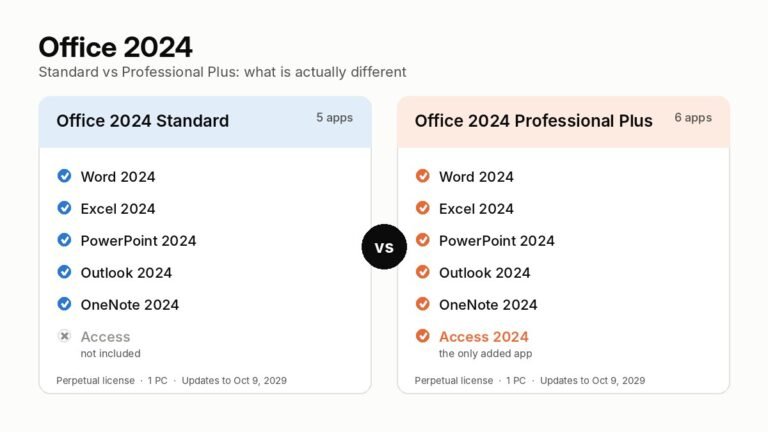
Office 2024 Standard and Professional Plus share the same Word, Excel, PowerPoint, Outlook and OneNote. Professional Plus adds Access. Here is how to choose,…
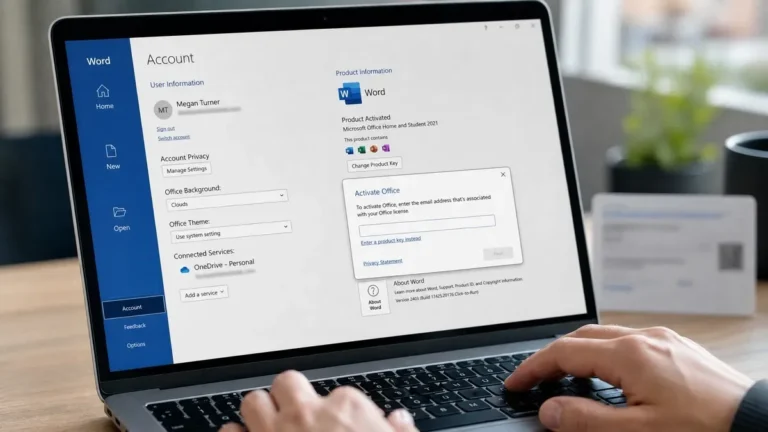
How to activate Microsoft Office: File > Account for Professional Plus keys, setup.office.com for consumer and Mac editions, plus fixes for common errors.
How fast will I receive my Microsoft license key after I pay?
In most cases your product key reaches your inbox within a few minutes of payment, at any hour of the day. As soon as the payment is confirmed, our system sends an email with your Microsoft license key, the official download link and a short installation guide written for normal people, not IT departments. The same details are saved in your account on our site, so you can open them again later without searching your mail.
If you don’t see the email after ten or fifteen minutes, look in your spam, junk and promotions folders first. Mail filters sometimes treat automated messages that contain a product key as suspicious, especially on Gmail and Outlook.com. Searching your inbox for “OfficeGSM” or your order number usually finds it. The second most common cause is a small typo in the email address typed at checkout, which happens a lot on phone keyboards.
Now and then a payment is held for a routine security check by the card processor, mostly on a first order or a larger business order. That can add a short delay, and you’ll hear from us if anything is needed on your side. Because every Windows key, Office key and Windows Server license we sell is delivered digitally, there’s no shipping, no customs and no waiting for a box, wherever you live.
Still nothing? Contact our support team with your order number and we’ll resend your key or send it to a corrected address. Most customers have Windows 11 or Office activated the same evening they order, often within half an hour of checkout.
Are your Microsoft product keys genuine?
OfficeGSM sells Microsoft product keys with digital delivery and installation help. Download software only from Microsoft and activate using the instructions for the edition you purchased.
An activation screen confirms activation status, but it does not by itself prove that a license permits your intended use. Before purchasing, review the listing and ask us about the license channel, device count, region restrictions and any qualifying license requirements. Keep your invoice and licensing records.
If a key fails activation, contact us with your order number and error message. Refund requests are subject to the 180-day refund policy and its eligibility requirements.
Is it legal to buy a cheap Windows or Office key online?
Price and successful activation alone do not establish a valid software license. Permitted use depends on the product’s license terms, how the license was supplied, device limits and any transfer or regional restrictions.
Before buying, ask the seller to identify the license channel and provide the records needed for your intended personal or business use. A marketplace profile is not proof that every product is an authorized retail license. Microsoft provides guidance on buying software safely.
OfficeGSM is an independent reseller operated by Makers Unity LLC. Contact us before purchase if you need confirmation about a product’s licensing requirements.
Why are your prices lower than the Microsoft Store?
OfficeGSM prices vary by product, edition and quantity. Our listings are delivered digitally, with no physical shipping. Compare the actual edition, license channel, device count and permitted use before comparing prices.
A lower price does not establish that two offers provide the same licensing rights. Ask us for product details before ordering, particularly for business, volume, Enterprise and Server products.
Setup help and the 180-day refund window are available subject to the published policy. Microsoft support and updates follow the lifecycle of the version purchased.
What happens if my Windows or Office key doesn’t activate?
If a key doesn’t activate, contact us and we’ll fix it with you. If it can’t be fixed, we send a replacement key or refund you under our 180-day refund window. You’re never stuck with a license that doesn’t work.
Most activation errors have nothing to do with the key itself, so it’s worth checking a few things first. Make sure every one of the 25 characters was typed correctly, since B and 8 or O and 0 are easy to mix up; copying and pasting from the email avoids that. Check that the edition matches: a Windows 11 Pro key won’t activate Windows 11 Home until you use it to upgrade the edition, and an Office Professional Plus key won’t activate a Microsoft 365 trial. Remove any old Office version or trial before installing a new one, because two versions on one PC often fight over activation.
A PC with the wrong date and time, a VPN that blocks Microsoft’s servers, or a firewall at work can also stop online activation. For Windows, the Activation page in Settings has a troubleshooter that fixes many of these. Phone activation is available as a fallback for most Windows and Office versions, and we’ll walk you through it.
When you contact us, send your order number, a screenshot of the error and the version you installed. Error codes like 0xC004C003 or 0x803F7001 tell us a lot. Our support team usually solves it in one conversation. Please don’t try activation tools or scripts found online in the meantime, since they can damage licensing files and make a clean fix harder.
Is this a one-time purchase or a subscription?
It’s a one-time purchase. Every Windows license key, Office key and Windows Server license we sell is perpetual, which means you pay once and keep using that version for as long as you like. There’s no monthly fee, no yearly renewal, no auto-billing and no expiry date on the license.
That’s the main difference from Microsoft 365. Microsoft 365 is a subscription: you pay every month or every year, you always get the newest Office apps plus cloud storage, and when you stop paying the apps switch to read-only mode. A perpetual Office 2024 or Office 2021 license works the other way around. You buy Word, Excel, PowerPoint, Outlook and the other apps once, they stay yours, and they keep receiving security updates until Microsoft’s support date for that version.
For Windows, a lifetime license works the same way. Your Windows 11 Pro key or Windows 11 Home key activates that PC permanently, and feature updates like new yearly releases of Windows 11 install through Windows Update at no extra cost. For Windows Server, a perpetual license covers that server edition for its full lifecycle, with monthly updates included.
So which is better? If you only need the desktop apps and want a predictable, one-off cost, a perpetual Office key is almost always cheaper over two or three years. If you want the newest features every month, lots of cloud storage and apps on several devices, Microsoft 365 can make sense. Our Microsoft Office page lists every lifetime version we carry, and we’re happy to help you choose.
What is the difference between retail, OEM and volume license keys?
The difference is who the license was made for and whether it can move between computers. All three activate the same genuine Microsoft software; what changes is the rules around the license.
A retail license is the version Microsoft sells to consumers in a box or as a digital download. It’s usually linked to a Microsoft account or activated online, and in most cases you can move it to a new computer after removing it from the old one. An OEM license is the type that comes preinstalled on a new laptop or desktop. It’s tied to the first machine it activates on, usually to the motherboard, and it isn’t meant to be transferred. It tends to be the cheapest option for a PC you plan to keep. A volume license is issued to businesses, schools and governments that deploy software on many computers under one agreement, often activated through the organization’s own server.
Why does this matter when you buy a Microsoft product key online? Because the cheapest listings on marketplaces are often volume keys or OEM keys sold outside the purpose they were made for, and those are the ones that tend to stop working later.
At OfficeGSM each product page describes how the key activates, how many devices it covers and what to do if you change hardware. Windows keys attach a digital license to your PC after activation, and if you replace the motherboard or buy a new computer, our team will tell you honestly what your options are. If you need licenses for an entire office, ask us about business and bulk licensing so you get a setup that fits your team.
Which Office should I buy: Office 2024, Office 2021 or Microsoft 365?
Compare the included apps, support dates and licensing requirements first. Office 2024 is a one-time purchase for the version bought; Microsoft 365 is a subscription with features and services that depend on the plan.
Office LTSC 2024 receives Microsoft support through October 9, 2029. Professional Plus adds Access to the core Office apps; Publisher and Teams are not included in LTSC 2024. Check Microsoft’s current operating system requirements before buying.
Microsoft support for Office 2021 ended on October 13, 2026. Support for Office 2016 and Office 2019 on Windows also ended. These versions may still run, but a new key does not restore Microsoft security updates. Office 2021 for Mac has also reached the end of support.
Windows 11 Home or Pro: which product key do I need?
Windows 11 Home is enough for most people at home. Choose a Windows 11 Pro key if you need BitLocker encryption, Remote Desktop access to your PC, Hyper-V virtual machines, or you want to join the computer to a company domain or Microsoft Entra ID.
Both editions run the same apps and games and get the same yearly feature updates. Home covers web browsing, Office, school work, streaming, photo editing and gaming without any limits. What Pro adds is aimed at work and security. BitLocker encrypts your whole drive, so a lost or stolen laptop doesn’t expose your files. Remote Desktop lets you connect to your PC from another device. Hyper-V and Windows Sandbox let you test software safely. Group Policy and domain join matter in offices where an IT person manages many computers. Pro also skips the requirement to sign in with a Microsoft account during setup, which some people prefer.
Price-wise, the gap between a Windows 11 Home key and a Windows 11 Pro key in our store is small, so many buyers go straight to Pro. If your PC already runs Home, you don’t need to reinstall: a Home to Pro upgrade key changes the edition in a few minutes and keeps your files and apps.
Also check your hardware before buying. Windows 11 needs TPM 2.0, Secure Boot and a supported 64-bit processor. On an older PC that can’t meet those requirements, a Windows 10 Pro key still installs and activates, but Windows 10 support ended on October 14, 2025, so plan an upgrade path. Browse every edition, including Pro N, Enterprise and LTSC, on our Windows operating systems page.
How do I activate my Windows or Office product key?
For Windows, open Settings, go to System, then Activation, choose Change product key and enter the 25-character key from your email. For Office, install it from the link we send, open Word or Excel and enter the key or sign in when asked. Activation usually takes less than a minute.
Here’s the Windows 11 route in a little more detail. If you’re installing fresh, create a USB drive with Microsoft’s Media Creation Tool, install the matching edition, and enter your Windows product key during setup or skip it and add it later. On an existing installation, Settings, System, Activation is the place to go. On Windows 10 it’s Settings, Update and Security, Activation. When it works you’ll see “Windows is activated” with a digital license linked to that PC.
For Microsoft Office, first remove any trial or older Office version from Settings, Apps. Then use the download link or redeem page in our email, install Office, open any app and follow the activation prompt. Some Office editions are redeemed with a Microsoft account, which is handy because the license then appears in your account for future reinstalls. Under File, Account you should see “Product Activated”.
For Windows Server, you can activate from Settings or from an administrator command prompt with slmgr, and we include the steps in your email.
If you’d rather not do it alone, that’s fine too. Every order includes free installation help from our support team, by email around the clock and by phone Monday to Friday, 9am to 6pm Eastern. We can guide you step by step, for one laptop or for a whole small office.
Which payment methods do you accept, and is checkout secure?
We accept Visa, Mastercard, Maestro, American Express, Discover, Diners Club, JCB, Apple Pay and Google Pay, and every payment goes through an SSL-encrypted checkout. Your full card number is handled by the payment processor, not stored on our website.
Checkout is short on purpose. You add your Windows key, Office key or Server license to the cart, enter your name and the email address where you want the key delivered, and pay. There’s no account required, although creating one lets you see your orders and keys in one place later. The padlock in your browser’s address bar confirms the connection is encrypted, and card payments may ask you to confirm with your bank app or a one-time code, which is a normal fraud protection step called 3-D Secure.
Apple Pay and Google Pay are the quickest options on a phone, and they add another layer of privacy because the merchant never sees your card number at all. If you’re buying for a business and need an invoice with your company name and VAT or tax number, add those details at checkout or message us and we’ll issue a proper invoice.
Once payment clears, your product key is sent straight away. If a payment fails, it’s usually a bank blocking an online purchase from a new store, and a quick approval in your banking app fixes it. If anything looks wrong, such as a charge without an email from us, contact our support team with the details and we’ll check it immediately. Prices on our site are shown in US dollars.
Can I buy Windows Server licenses and multiple keys for my business?
Yes. We sell Windows Server 2025 and Windows Server 2022 licenses in Standard and Datacenter editions, including 16-core license packs, plus multi-PC packs for Windows and Office, and we can prepare bulk and business licensing on request.
Windows Server licensing works differently from Windows or Office. It’s licensed by physical cores, with a minimum of 16 cores per server, which is why the Windows Server 2025 Standard 16-core license is such a popular choice for small business servers. The edition decides your virtualization rights: Standard covers up to two virtual machines when all cores are licensed, while Datacenter allows unlimited virtual machines on that host and adds features like Storage Spaces Direct. For a file server, domain controller or small Hyper-V host, Standard is usually enough. For a busy virtualization host, Datacenter tends to work out cheaper.
Keep in mind that users or devices connecting to a Windows Server may also need Client Access Licenses (CALs), and Remote Desktop Services needs its own RDS CALs. Those aren’t included with a server license unless the product says so. If you’re not sure what your setup needs, tell us how many users, devices and cores you have, and we’ll help you work it out.
For desktops, our Windows 11 Pro 5 PC and Office 2021 Professional Plus 5 PC packs keep a small office on one order and one invoice. For larger numbers, contact our team for a quote. We’ll list every license on the invoice, so your records stay clean if anyone ever asks for proof of licensing. Browse every edition on our Windows Server licenses page.